If you run an online store, timely emails from WooCommerce are a critical part of customer service. Order confirmations, new order notifications, invoices and delivery status updates all build trust and help customers know what is happening with their purchase. When a WooCommerce not sending emails problem occurs, however, it can lead to missed orders, confused customers and unnecessary load on your support team. The good news is that in most cases the cause can be identified relatively quickly.
In this article you will find the most common causes, practical diagnostic steps and the most effective solutions for restoring reliable email delivery from WooCommerce.
Why Is WooCommerce Not Sending Emails?
WooCommerce relies on WordPress for the actual sending of emails. By default WooCommerce uses the wp_mail() function, and WordPress in turn typically uses PHP mail() or another server-level mail configuration. This means the problem is not always in WooCommerce as a plugin. Often it lies in how the server is configured, in hosting restrictions, in deliverability, in the domain's DNS records or in a conflict with another plugin or theme.
The role of the hosting provider is significant. Many sites use web hosting that is not optimised for reliable transactional email delivery. Even when a message is formally sent, that does not mean it was successfully delivered to the customer's inbox. WordPress explicitly notes that a successful result from wp_mail() does not guarantee actual receipt of the email. This is especially important in cases such as woocommerce confirmation email not sending, woocommerce invoice email not sending or woocommerce new order email not sending, where the problem may be in delivery rather than in the generation of the message itself.
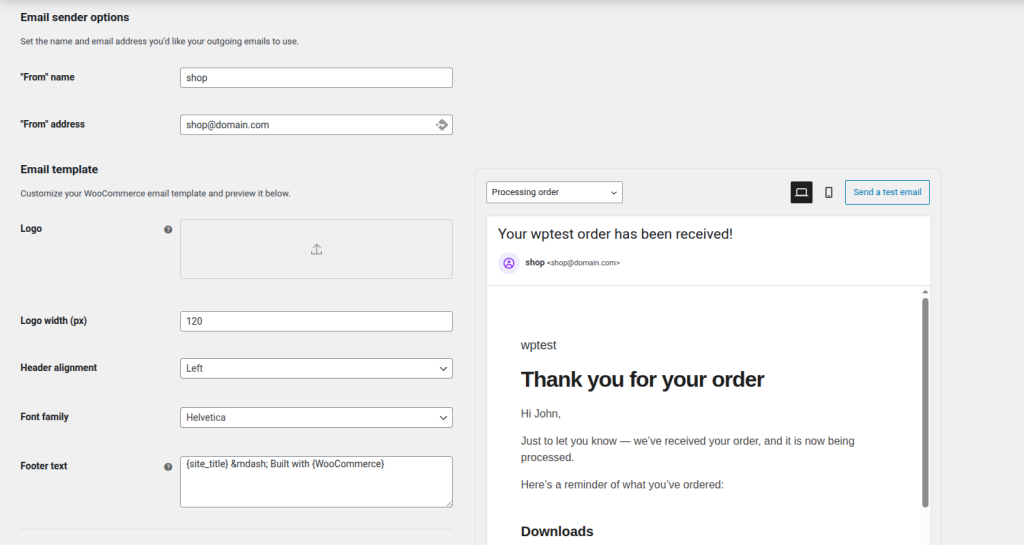
Among the most common causes are incorrect WooCommerce settings, disabled notifications, a wrong address in the "From" fields, use of the standard PHP mail mechanism instead of SMTP, missing SPF/DKIM/DMARC records and messages being marked as spam. WooCommerce officially recommends checking that emails are enabled under WooCommerce → Settings → Emails and that the "From" address belongs to your own domain, because addresses from Gmail or Yahoo frequently lead to poorer deliverability.
How to Fix the Problem When WooCommerce Is Not Sending Emails
The best approach is to work through several checks in order, rather than changing everything at once. This way you will find out whether the problem is in order statuses, notification settings, spam filters, wp_mail() or the overall deliverability of the server. WooCommerce has built-in email settings and official troubleshooting documentation, which provides a good foundation for systematic diagnosis.
Check Orders in Pending Payment Status
The first thing to check is whether the problematic orders have actually reached a status at which WooCommerce should send an email. On many stores the confusion comes from a customer reaching the payment page but not completing the payment. In such a case the order often remains in Pending payment status, which can change which notifications are triggered and when. WooCommerce has a clear order status system and it is precisely this that determines which transactional emails are sent.
If you see many orders stuck in Pending payment, the problem is probably not just with emails. Customers may be abandoning the payment page, the payment method may not be returning the correct status to WooCommerce, or there may be a conflict in the checkout process. This is a common cause for reports where WooCommerce is not sending emails to customers, when in reality the order has not moved to a status that triggers the corresponding email.
If you suspect a conflict, temporarily deactivate all plugins except WooCommerce and switch to a default theme to test whether orders and notifications behave normally. WooCommerce notes that conflicts between plugins, themes and the hosting environment are a frequent cause of such problems. This is especially useful if emails are failing only in specific scenarios — for example with a particular payment method or a certain theme.
You can also enable WordPress debug mode to see more detailed PHP errors or warnings. If sending is interrupted by a fatal error, it is often visible after enabling debug mode or in the server logs.
Check Email Settings and Deliverability
WooCommerce has built-in transactional emails for new order, cancelled order, failed order, order processing, completed order, refund, customer note and more. All of them are managed from the WooCommerce → Settings → Emails section. There you can see which notifications are enabled, which recipients are set and what the general sender details are.
If, for example, "Processing order" or "Completed order" is disabled, WooCommerce will not send it even if everything else is working correctly.
Next, review the sender address. WooCommerce recommends that the "From" address belongs to your domain — for example orders@yourdomain.com — rather than a free email like Gmail. The reason is that this directly affects deliverability and the likelihood that the message will be accepted as legitimate by receiving servers. An incorrectly set sender greatly increases the chance of complaints, even when emails technically leave the site.
Also check with your hosting provider. Some hosts limit the number of outgoing emails, block PHP mail or require the use of an external SMTP provider. WooCommerce has separate documentation on the role of SMTP and emphasises that understanding how sending works is key to stable transactional email delivery. If the hosting is not suited to email, the right solution is often not merely "fixing" WooCommerce but switching to SMTP.
We always recommend using an SMTP connection for sending messages.
For testing it is useful to use an email checking and logging plugin. The Check & Log Email plugin is designed precisely for sending a test email and reviewing logs, which helps you determine whether WordPress is actually sending messages at all. This is very practical when you want to quickly separate the problem "WordPress is not sending" from "the email is sent but not arriving".

Test Whether Emails Are Landing in Spam
Sometimes the store is actually sending emails, but customers do not see them because they land in spam or are rejected due to a poor domain reputation, missing DNS records or inappropriate content.
A practical way to check this is with Mail-Tester. The service generates a test address to which you send an email from your site, then analyses the message, mail server and IP address and gives a score for spam risk and configuration problems. This way you can find out whether you have a problem with SPF, DKIM, DMARC, content, headers or the general reputation of the sending server.
If the result is poor, pay attention to:
- The domain's SPF record;
- DKIM signing;
- DMARC policy;
- whether the "From" address matches the domain;
- whether you are using a real SMTP provider instead of PHP mail.
These factors are often decisive in cases where emails appear not to be sending and it looks like a WooCommerce problem, when in reality it is a pure deliverability issue.
Configure SMTP for Sending Emails
This is one of the most reliable solutions when WooCommerce emails are not reaching recipients. Instead of WordPress relying on PHP mail, SMTP uses a specialised mechanism or external provider for sending. WooCommerce has separate documentation on SMTP providers and emphasises their role in more reliable delivery of transactional emails.
A popular option is the Easy WP SMTP plugin, which supports SMTP server configuration or integration with external mail services. The plugin's official page notes that it was created specifically to improve deliverability and includes tools for debugging failed sending events.
The typical process is as follows:
- Install and activate Easy WP SMTP.
- Choose an SMTP provider or the manual SMTP configuration option.
- Enter the SMTP host, port, encryption, username and password.
- Set the "From" email and "From" name.
- Send a test email.
It is also important to use an email address that belongs to your domain and to ensure that the DNS records are configured according to the requirements of your chosen SMTP provider. Without this, even SMTP will not deliver its full benefit.
Check the wp_mail() Function in WordPress
The wp_mail() function is WordPress's built-in function for sending emails from WordPress itself. WooCommerce uses it by default, so if it is not working correctly the problem will also affect the store's emails.
Review WordPress and Server Logs
First review the server's error logs. These are usually found in the hosting control panel or in the server's system logs. Look for messages related to wp_mail(), PHPMailer, SMTP errors, timeouts, authentication problems or fatal PHP errors. WordPress notes that the formatting of the email is its responsibility, but sending depends on the server's mail environment — so logs are especially important for distinguishing a problem in WordPress from a problem in the mail configuration.
Debug WordPress via WP_DEBUG
Enable WP_DEBUG in wp-config.php, and if needed enable logging to a file as well. Then simulate a test order or use a test email plugin to trigger sending. If there are PHP warnings, plugin errors, incompatibilities or hook problems around emails, they will often appear here. This is one of the best ways to find out why messages are not being sent in a specific installation, especially when the problem only occurs after checkout.
Direct Test of wp_mail()
You can also run a direct test of wp_mail() outside of WooCommerce. The idea is to use a small test script or test plugin that sends a message via wp_mail() to your own address. If this test does not work, the problem is almost certainly not in WooCommerce but in the overall WordPress/mail configuration. If the test works but WooCommerce emails do not, then the investigation should focus on order statuses, hooks, themes, plugins or WooCommerce email settings. WordPress documentation also notes that a successful function result is not a guarantee of delivery, so after the test always check the spam/deliverability side as well.
Need WooCommerce Support? Jump.BG Can Help
If you would rather not go through logs yourself, configure SMTP, test DNS records and hunt for plugin conflicts, the more practical approach is to turn to a team with real WordPress and WooCommerce experience. When the problem is WooCommerce cannot send email messages — especially when it affects real orders and customers — timely action is critical, not only from a technical standpoint but also for preserving trust and the smooth running of your online store.
With our technical support you get:
- a review of WooCommerce email settings;
- inspection of order statuses and trigger logic;
- diagnosis of wp_mail();
- SMTP configuration;
- verification of SPF, DKIM and DMARC;
- deliverability and spam testing;
- identification of conflicts with a theme, plugin or payment method.
If you are looking for professional help with WordPress and WooCommerce, take a look at the Jump.BG service: WordPress support.
Conclusion
The WooCommerce email problem is rarely "just" a WooCommerce issue. In most cases it results from a combination of order statuses, email settings, hosting limitations and deliverability factors.
By working through the key checks in order — order statuses, WooCommerce email settings, spam tests, SMTP configuration and the wp_mail() function — you can usually identify the source of the problem fairly quickly.
This approach not only helps resolve the current problem but also leads to more reliable communication, fewer missed orders and a more stable overall user experience.
If you have questions or need assistance, you can contact us at support@jump.bg or via the chat on our website.