We are alerting you that fake emails are currently circulating that present themselves as official communications from Jump.bg.
The purpose of these emails is to trick recipients into visiting a fake website and entering their login credentials or payment information.
What the Fake Email Looks Like
We are currently observing messages that:
- are sent from an address that does not contain @jump.bg;
- claim that your domain is expiring today and needs to be renewed urgently;
- contain a button with the text "Renew Your Domain Now".
This is not an official communication from Jump.bg.
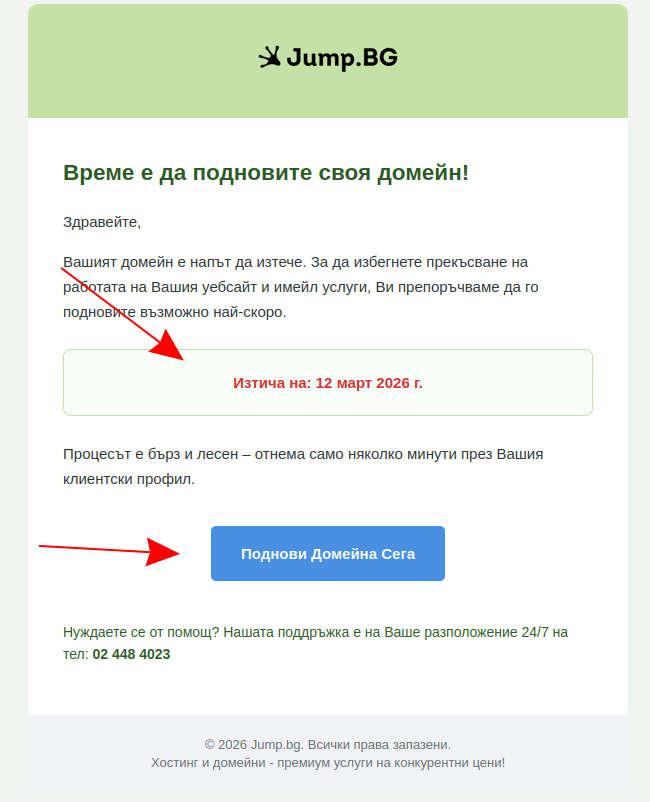
IMPORTANT! Do not click the "Renew Your Domain Now" button.
The button in this email leads to a fake website designed to steal your credentials and payment information.
If you receive such a message:
- do not open any links in it;
- do not click the button;
- do not enter your username, password or payment details;
- delete the email after reviewing it.

How to Recognise a Real Email From Jump.bg
Official emails from Jump.bg can be recognised by the following signs:
- they are sent only from email addresses with the @jump.bg domain;
- they contain your name and the specific domain they relate to;
- if in doubt, you can log in directly to jump.bg through your browser, without using links from the email.
If you have any doubt about the authenticity of a message, do not take any action through the email itself.
What to Do If You Have Already Clicked
If you have pressed the button in the email:
- do not enter any data on the page you were redirected to;
- close the page immediately;
- change your Jump.bg password as soon as possible.
If you have already entered bank or card information:
- contact your bank immediately;
- inform them that your details may have been compromised;
- follow your bank's instructions to limit the risk.
Recommendation
Always check the sender of an email carefully before opening links or taking any action. If in doubt, access Jump.bg directly through your browser rather than through a button or link in the message.
We recommend that you activate two-factor authentication. Log in to your client profile, go to the "Security Settings" menu and enable "Two-Factor Authentication".
More information can be found in our help article on activating two-factor authentication.
If you notice phishing emails in the future, please contact us immediately at support@jump.bg.